Setup CI (Legacy Approach)
Note
This guide covers the legacy include-based approach for GitLab < 17.0 or projects not yet ready to migrate to components.
For GitLab 17.0+, we recommend using the component-based approach: Setup CI with Components
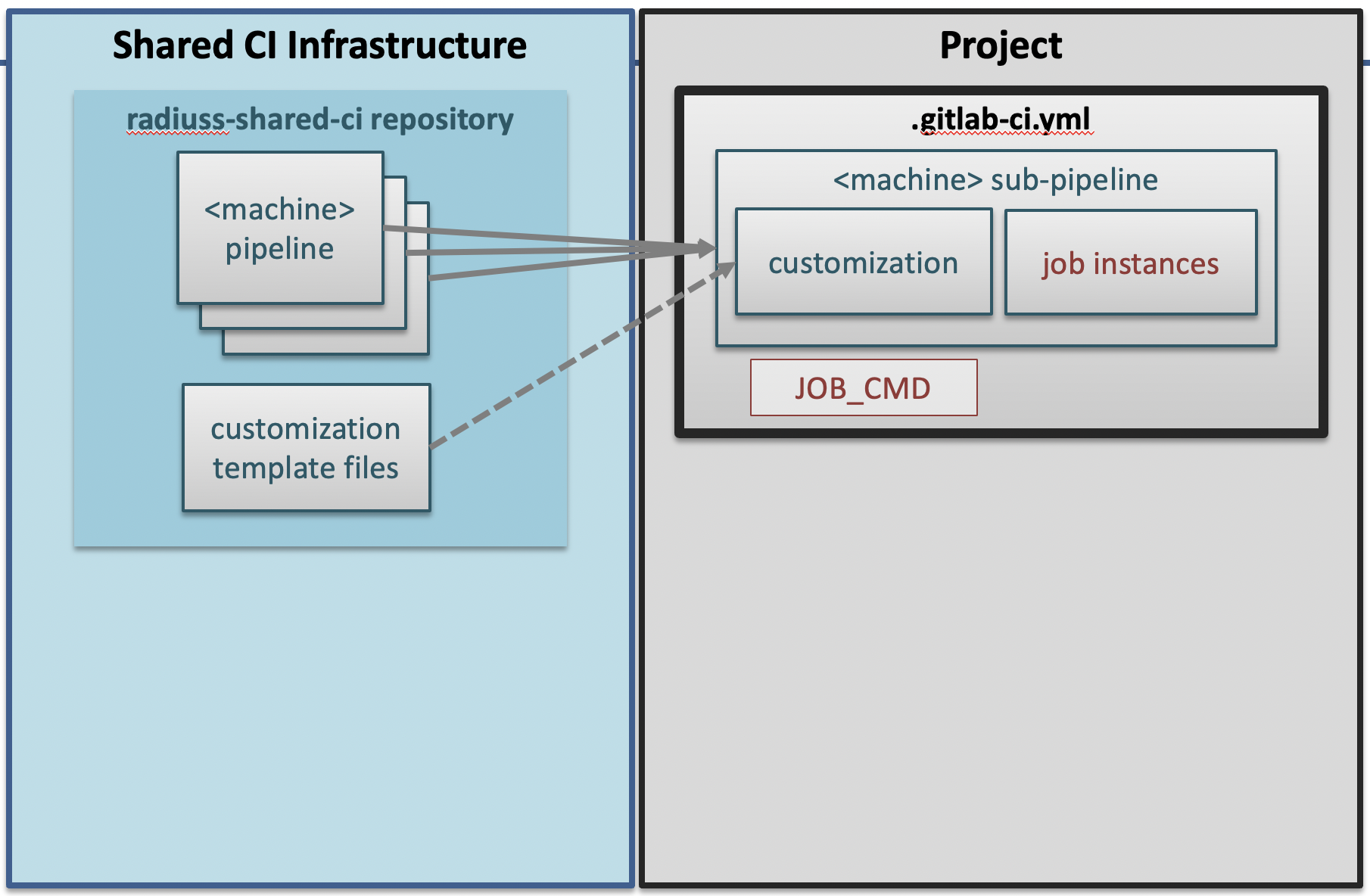
The Shared CI Infrastructure is project agnostic.
The pre-requisite for using the RADIUSS Shared CI Infrastructure is that your build and test process can be invoked through a single command line.
Strict separation between the build/test process and CI infrastructure helps with maintenance: it’s easier to debug a standalone script that can be run outside CI.
Note
RADIUSS CI setups typically don’t split build and test phases to avoid complexity and artifacts. However, complex workflows are supported. See Implement Complex CI Workflows for details.
RADIUSS projects typically leverage Spack to manage dependencies and configure the project. This is documented in RADIUSS Spack Configs.
Warning
radiuss-shared-ci is meant to live on the LC GitLab instance. The main repo is hosted on GitHub for accessibility and visibility and is mirrored on LC GitLab. To include files from radiuss-shared-ci, point to the mirror repo on GitLab.
Overview
By sharing the CI definition, projects share the maintenance burden.
With centralized CI configuration, we create an interface between local and shared configurations, keeping it minimal while allowing customization.
Projects set variables and add job instances (inheriting from job templates).
Files in the customization directory allow fine tuning.
Note
GitLab allows projects to include external files to configure their CI. Legacy RADIUSS Shared CI relies on this mechanism.
File structure
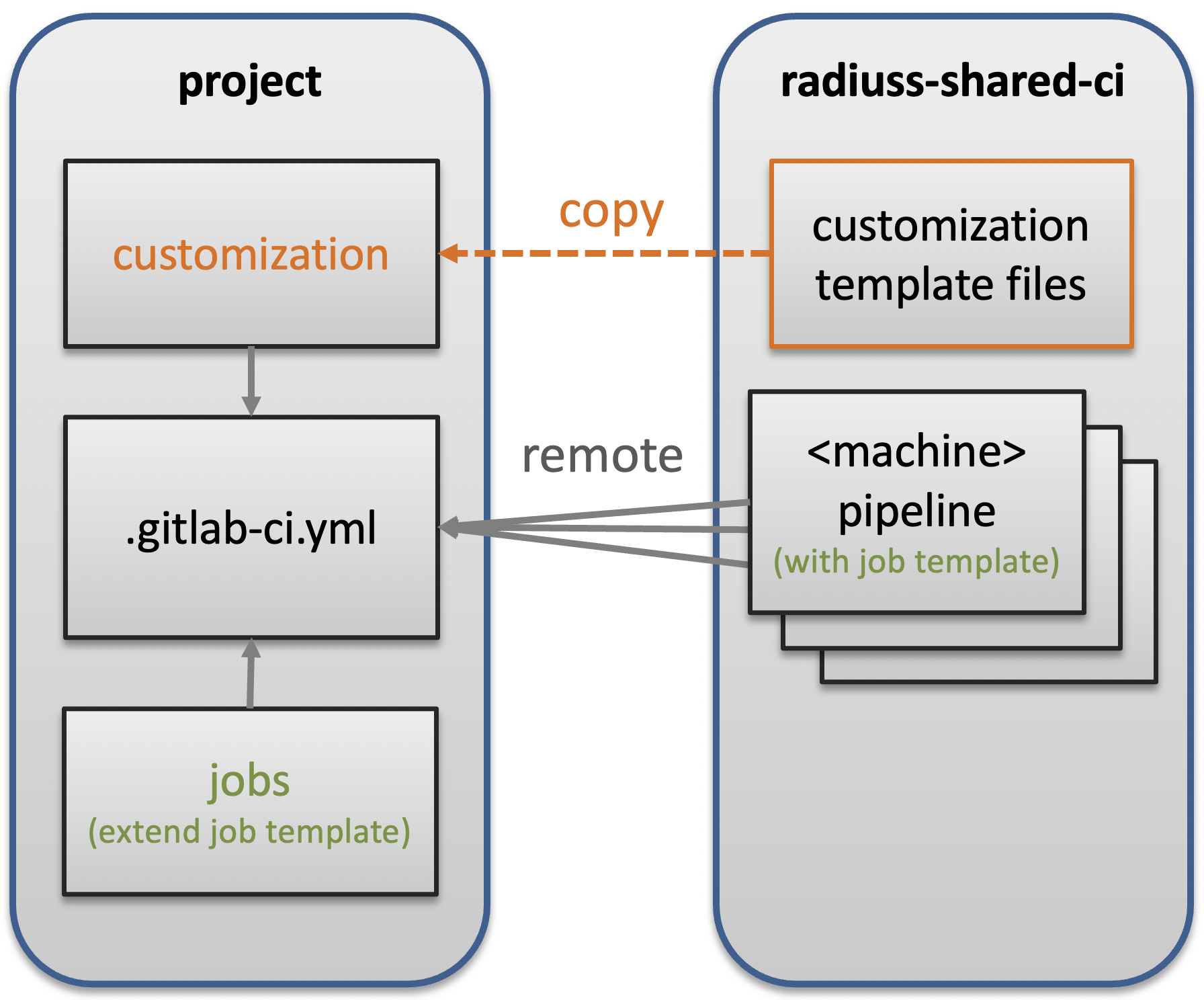
RADIUSS Shared CI contains files included remotely and template files to copy and complete.
The short version
Summary of integrating RADIUSS Shared CI (legacy approach):
### Prerequisites
# write CI script

### CI Setup
cd my_project/..
git clone https://github.com/LLNL/radiuss-shared-ci.git
cd my_project
cp ../radiuss-shared-ci/customization/gitlab-ci.yml .gitlab-ci.yml
mkdir -p .gitlab/jobs
cp ../radiuss-shared-ci/customization/subscribed-pipelines.yml .gitlab
cp ../radiuss-shared-ci/customization/custom-jobs-and-variables.yml .gitlab
cp ../radiuss-shared-ci/customization/jobs/<machine>.yml .gitlab/jobs/<machine>.yml
vim .gitlab/subscribed-pipelines.yml
# comment out machines you don't want
vim .gitlab/custom-jobs-and-variables.yml
# set variables
vim .gitlab/jobs/<machine>.yml
# add jobs

### Mirroring Setup
# https://docs.gitlab.com/ee/ci/ci_cd_for_external_repos/github_integration.html

### Non-RADIUSS projects
# Set GITHUB_STATUS_TOKEN in GitLab CI/CD variables
Jump to Customize the CI and Add jobs for details.
The detailed version
CI implementation parts:
Local build-and-test script
Shared files
Customization files
Jobs
Setting up CI follows these steps.
Write CI Script
Prepare a CI script called via JOB_CMD in the CI.
Core CI implementation
Clone RADIUSS Shared CI locally:
cd my_project/..
git clone https://github.com/LLNL/radiuss-shared-ci.git
cd my_project
Copy the main CI file:
cp ../radiuss-shared-ci/customization/gitlab-ci.yml .gitlab-ci.yml
In .gitlab-ci.yml, adapt these variables:
Parameter |
Description |
|---|---|
|
Service User Account (optional but recommended) |
|
CI working directories location (if not using service user) |
|
Clone strategy ( |
|
GitHub project name |
|
GitHub organization |
|
Build and test command |
|
Branches skipping draft PR filter |
Note
Blank variables don’t require values. Variables with “…” require one.
Warning
We strongly recommend using a service user account for easier permissions and allocation management.
Your CI now includes remote files from GitLab mirror of radiuss-shared-ci.
Customize the CI
Copy customization templates:
mkdir -p .gitlab
cp ../radiuss-shared-ci/customization/subscribed-pipelines.yml .gitlab
cp ../radiuss-shared-ci/customization/custom-jobs-and-variables.yml .gitlab
The .gitlab/subscribed-pipelines.yml file
Select machines by commenting out unwanted ones.
Note
To add a new machine, see Add a New Machine.
The .gitlab/custom-jobs-and-variables.yml file
Variables in this file:
Parameter |
Description |
|---|---|
|
Shared allocation name |
|
Shared allocation parameters (optional, may be set to “OFF”) |
|
Job allocation parameters |
|
Global variants for shared specs |
|
Global dependencies for shared specs |
You may modify .custom_job for project-specific setup (e.g., export jUnit test reports).
Add jobs
Create job files using templates:
cp ../radiuss-shared-ci/customization/jobs/<machine>.yml .gitlab/jobs/<machine>.yml
Edit to add jobs extending the machine template.
Warning
Use unique job names to avoid overriding shared jobs.
Note
Jobs can be imported from other repositories. See Import shared jobs.
Mirroring Setup
GitLab provides GitHub integration for mirroring. See GitLab documentation.
Non-RADIUSS Projects
For projects outside RADIUSS group, create a GitHub token with repo:status
permissions and register as GITHUB_STATUS_TOKEN CI/CD variable in GitLab.
Visit https://lc.llnl.gov/gitlab/<group>/<project>/-/settings/ci_cd
See Also
Setup CI with Components - Modern component-based approach
Migrating to GitLab CI Components - Migration guide
How To - Common tasks
Troubleshooting - Troubleshooting guide