How To…
This section describes how to perform various maintenance tasks once you have the RADIUSS Shared CI framework set up for your project.
Leverage Spack
Initially, the RADIUSS Shared CI infrastructure was designed for RADIUSS projects also using Spack to describe the toolchain and build the dependencies. This “build infrastructure” is defined in RADIUSS Spack Configs documentation.
Spack provides a unified context to express toolchains, machine setup, and build sequence. Spack is increasingly used to install dependency stacks of large simulation codes.
Using RADIUSS Spack Configs allows projects to easily share the full context of their builds.
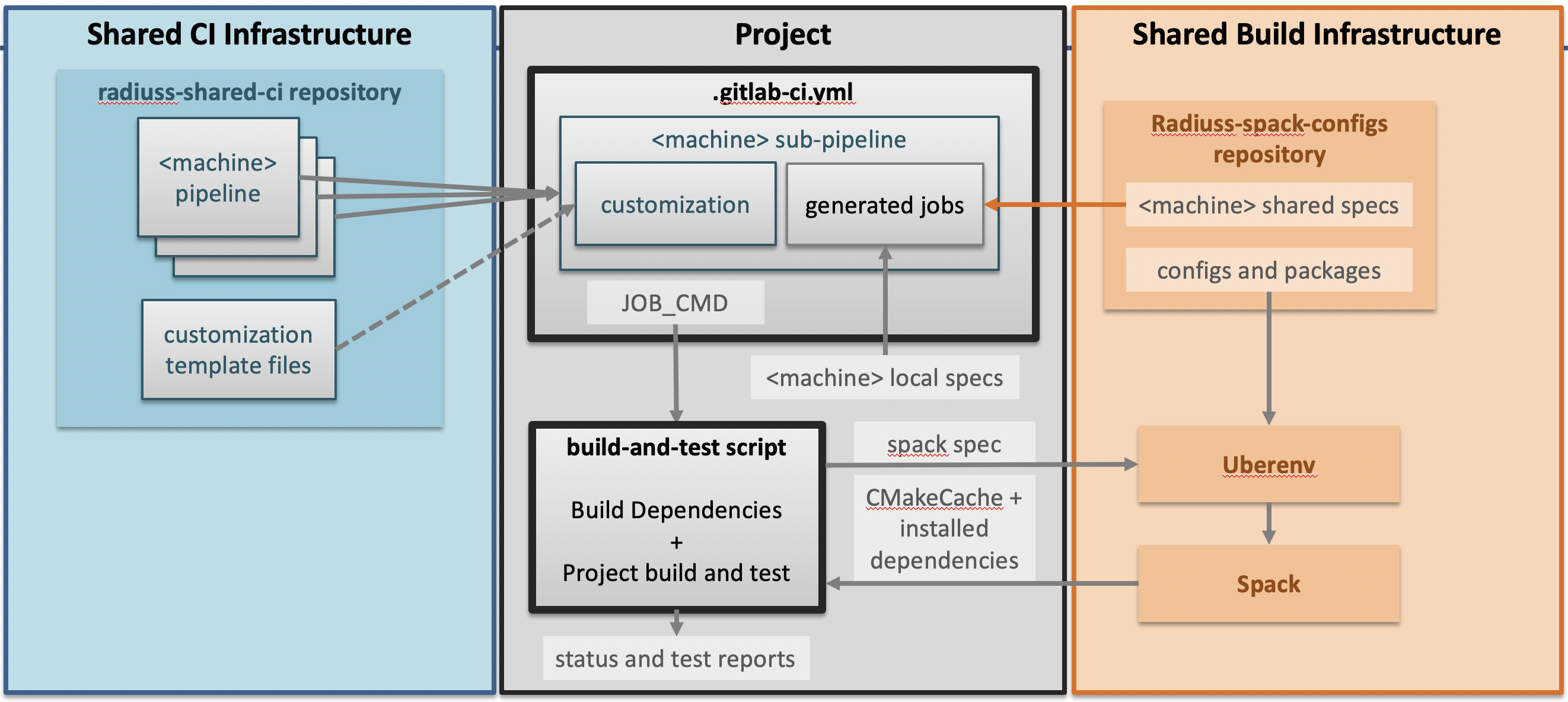
The Shared CI Infrastructure is project agnostic. It is tuned for open-source projects hosted on GitHub and willing to run CI on a GitLab instance. It currently only supports a handful of Livermore Computing machines, but more could be added without disrupting the design.
If you were to adopt the full infrastructure, setting up the build infrastructure would be done following two steps:
Use Spack to install dependencies and configure a project build.
Setup your build system so that it accepts the configuration file generated by Spack.
Implement Complex CI Worflows
In the CI setup description, the resulting worflow gathers all the jobs withing
one stage, with jobs calling only the JOB_CMD one-line command.
Restricting the job command to a one-liner is required because we append it to an allocation call. In our opinion, it is not restrictive because it is a good practice to define your scripts outside the CI YAML files.
However, it may appear restrictive to only allow one-stage pipelines.
In facts, the RADIUSS Shared CI defines 3 stages for you to use. They are named
jobs-stage-<1,2,3>. They stand between the allocate-resources and the
release-resources stages, which means that jobs will run within the shared
allocation as long as they inherit from the shared job template (extends:
.job_on_<machine>).
In your local jobs definition, you may pick the stage with the key
stages: jobs-stage-<1,2,3>. This will override the default value set in the
job template (jobs-stage-1).
It is also possible to go further in the customization and override the list of stages to add more. We only warn you that a good understanding of the Shared CI implementation is required before overridding it.
Warning
GitLab YAML syntax allows you to override any section previously defined. This opens to door to deep customization of the Shared CI implementation. However it requires a good understanding of how the Shared CI works. In general, we advise you to start by submitting a feature requests on GitHub: we are open to suggestions and can help with your customization needs.