Use Spack to install dependencies and configure the project build
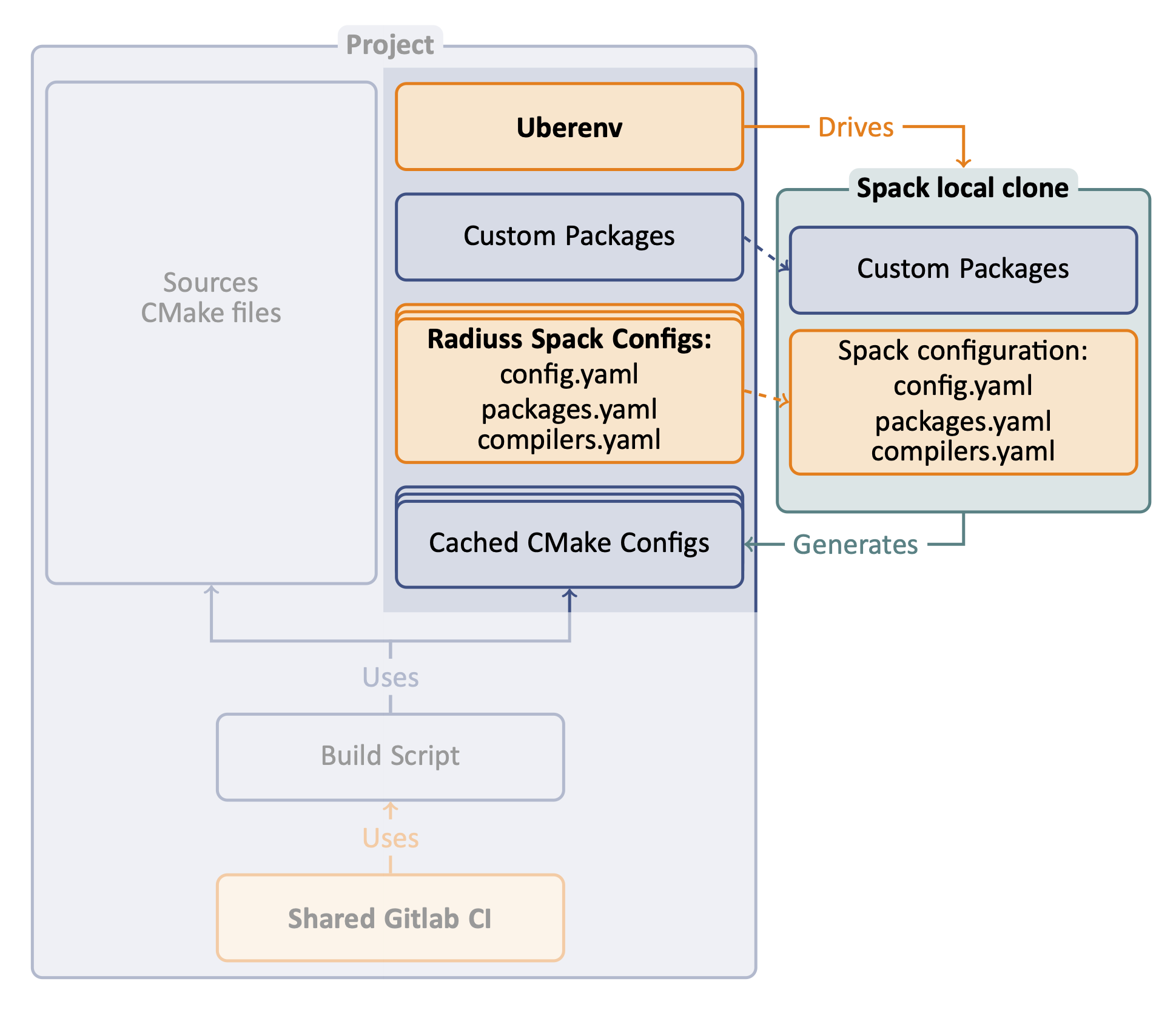
The first step in adopting RADIUSS CI infrastructure is to setup your project so that Spack can be used to install the dependencies and generate a configuration file for the build.
The above figure illustrates how we use Uberenv to drive Spack, which is configured with custom packages and RADIUSS Spack Configs. The end product is a CMake Cached configuration file.
Note
In Spack, packages that inherits from the CachedCMakePackage class generate a CMake Cached configuration file during the project build. We used to implement this logic by ourselves in our Spack packages. MFEM stands out as the only non-CMake project that also generates a configuration file that is used in the CI workflow with Uberenv.
Why Spack
Spack provides a single context to express toolchains, machine setup and build sequence. Using it will allow us to share configuration files to describe the toolchains and machines setup. RADIUSS Spack Configs is the repository where RADIUSS projects Spack configuration is shared.
Spack is increasingly used to install the dependency tree of large simulation codes. As such, it makes sense to use Spack early in the development process.
Note
We are not promoting a “Spack everywhere” strategy. But we advocate that Spack should be one of the ways to configure and build your projects, since you projects will likely be built that way in production someday.
End product
The end product should be a script that takes a Spack spec as an input, and returns the configuration file generated by Spack after installing the dependencies for the given spec.
We rely on Uberenv to facilitate the setup of a local and isolated spack instance that will be used to build the project dependencies. We strongly suggest that you start with Uberenv to benefit from a reliable Spack usage in your CI (tried and tested) and keep your script simple.
Uberenv Guide
The role of Uberenv is to set up your Spack instance and then drive Spack to install your project dependencies and generate the configuration file.
Note
Uberenv will create a directory uberenv_libs containing a Spack
instance with the required project dependencies installed. Spack then
generates a CMake configuration file (<config_dependent_name>.cmake)
at the root of the project repository.
One common source of error when using Uberenv is when the uberenv_libs
folder is out of date after a Spack update. To resolve, make sure this
uberenv_libs is deleted before running it again for the first time
because it needs to be regenerated.
Getting Uberenv as a submodule (recommended)
Get uberenv.py script.
Use
git submodule addto get Uberenv into auberenvdirectory.Edit .uberenv.json.
Create
.uberenv.jsonin a directory that is a parent ofuberenv. Set your project package name, and other parameters like Spack reference commit/tag (we suggest the latest release tag).Add RADIUSS Spack Configs submodule.
Use
git submodule addto get RADIUSS Spack Configs in a second submodule or custom location.In
.uberenv.jsonsetspack_configs_pathto point to<some_relative_path>/radiuss-spack-configs.
Add custom packages.
- If you need to make local modifications to your project package or a
dependency package, you may put it in a corresponding directory:
<some_relative_path>/packages/<package_name>/package.py.- Then, in
.uberenv.json, setspack_packages_pathto point to <some_relative_path>/packages
Make sure that <your_project>/package.py generates a CMake configuration file.
This is usually done adding a specific stage to the package. In particular, Spack now supports this for CMake build system with the CacheCMakePackages class. (see Setup your Spack package to generate a configuration file for details, and Umpire, CHAI, RAJA for implementation examples).
Getting Uberenv by clone/fetch/copy
Get uberenv.py script.
Clone/Fetch/Copy it from Uberenv repository. into a
uberenvdirectory, not as a submodule.Edit uberenv/project.json.
Set your project package name, and other parameters like Spack reference commit/tag (we suggest the latest release tag).
Add RADIUSS Spack Configs submodule.
Use
git submodule addto get RADIUSS Spack Configs.Create a symlink
uberenv/spack_configsthat points toradiuss-spack-configs.
Add custom packages.
If you need to make local modifications to your project package or a dependency package, you may put it in a corresponding directory:uberenv/packages/<package_name>/package.py.Make sure that <your_project>/package.py generates a CMake configuration file.
This is usually done adding a specific stage to the package. In particular, Spack now supports this for CMake build system with the CacheCMakePackages class. (see Setup your Spack package to generate a configuration file for details, and Umpire, CHAI, RAJA for implementation examples).
Setup your Spack package to generate a configuration file
We want to build the dependencies with Spack and then build the project with those dependencies but outside of Spack. We need to generate a CMake configuration file that reproduces the configuration Spack would have generated in the same context. It should contain all the information necessary to build your project with the described toolchain and dependencies.
In particular, the configuration file should setup:
flags corresponding with the target requested (Release, Debug).
compilers path, and other toolkits (e.g. cuda), etc.
paths to installed dependencies.
any option that may have an impact on your build.
This provides an easy way to build your project based on Spack configuration while only using CMake and a traditionnal developer workflow.
CMake projects: Spack CachedCMakePackage
CMake is strongly recommended to adopt RADIUSS CI workflow, mostly
because of this step. With CMake, we generate a cache file describing the
configuration necessary to trigger a build later on. This is supported in Spack
as soon as your package inherits from CachedCMakePackage.
Once your package has been ported, in Spack, stopping an installation after the
initconfig phase will prevent it from building your project and the CMake
configuration file will have been generated already.
Non-CMake projects: Custom implementation
The only example of a non-CMake project that adopted this workflow is MFEM. Altough it is using a Makefile build system in its Spack Packages, MFEM is generating a configuration file that can be used just like a CMake configuraton file. We adapted the implementation of the package to mimics the mechanism available in CMake-based packages. You may use that as an example.